Repository navigation
feat: add flashcards and matching block editors - #3351
samuelallan72 wants to merge 12 commits into
Conversation


 openedx-webhooks
added
the
open-source-contribution

|
Thanks for the pull request, @samuelallan72! This repository is currently maintained by Once you've gone through the following steps feel free to tag them in a comment and let them know that your changes are ready for engineering review. 🔘 Get product approvalIf you haven't already, check this list to see if your contribution needs to go through the product review process.
🔘 Provide contextTo help your reviewers and other members of the community understand the purpose and larger context of your changes, feel free to add as much of the following information to the PR description as you can:
🔘 Get a green buildIf one or more checks are failing, continue working on your changes until this is no longer the case and your build turns green. 🔘 Update the status of your PRYour PR is currently marked as a draft. After completing the steps above, update its status by clicking "Ready for Review", or removing "WIP" from the title, as appropriate. Where can I find more information?If you'd like to get more details on all aspects of the review process for open source pull requests (OSPRs), check out the following resources: When can I expect my changes to be merged?Our goal is to get community contributions seen and reviewed as efficiently as possible. However, the amount of time that it takes to review and merge a PR can vary significantly based on factors such as:
💡 As a result it may take up to several weeks or months to complete a review and merge your PR. |


e2ee74b to
e3c735c
Compare

|
Hi, I'd just like to make you aware that this repo is scheduled to be converted to frontend-base starting this month, and we're trying to hold off on merging any new editors until that has happened and we have a new plugin-based system for adding editors. (And when that's ready, you may not need to merge them here at all, though details are TBD.) From a quick look, it looks like this editor is implemented using our best practices and is well isolated, so I don't anticipate any issues. But I'm not sure exactly how much will change once we have plugin support. Please let me know if not getting it merged in the next few weeks is going to cause any problems. |
|
Thanks for the heads up @bradenmacdonald 🙂 @Kelketek is this timeline ok for you? (waiting for a few weeks) If so, I'll drop development here and resume once the new plugin system is ready. |

|
@samuelallan72 I'm OK with that so long as the client version is not held up. We don't have a few weeks margin there. So I'd suggest continuing to work on this and backport it, and then we can see about reconciling post-plugin changes later when upstream is ready. |
|
@Kelketek got it, I'll continue working on this then. 👍 |
bc85851 to
fc0f249
Compare
fc0f249 to
78d93e9
Compare
|
@Kelketek I've prepared the editor for the flashcards component for review. I'm in unfamiliar territory, as I haven't worked with contexts, external react stores, etc. very much. To implement the editor, I copied from the existing GamesEditor, and simplified it as much as I could. I'd appreciate your input, especially since you wrote the PdfEditor, and it looks like it uses a different structure with the context components, which surprises me because the GamesEditor had comments that suggested inspiration from the PdfEditor. I don't understand enough to know if that will work better here, or if there was a particular reason for the diverging designs. Anyway, comments and suggestions welcome! Once you're happy with it, I'll copy it to implement the MatchingEditor and re-add tests. :) |

 Kelketek
left a comment
Kelketek
left a comment
There was a problem hiding this comment.
Thanks, @samuelallan72 . I've left a review--- there are indeed some improvements to how we can leverage contexts here. The games block's editor was originally written in Redux and then was refactored to not need it. There's some artifacting there, so the PDF block is a better canonical example overall of how to use Contexts to build an editor.
| settings, | ||
| setShuffleStatus, | ||
|
|
||
| list, |
There was a problem hiding this comment.
@samuelallan72 There are a lot of arguments being handed here. Can we use a context instead?
| * `useSyncExternalStore`. Changes are the pure functions in flashcardsTransitions. | ||
| * React Query owns the requests. No Redux: this app is moving off it. | ||
| */ | ||
| export const useFlashcardsState = (block: BlockRef | null) => { |
There was a problem hiding this comment.
@samuelallan72 Rather than doing this, you should create a context that is populated with these values. By making this a hook, it's scoped only to the component which calls it, requiring you to pass the values down to every subcomponent.
Having it in a context means all subcomponents can pull from the context what they need without having to be handed the argument explicitly.
|
@Kelketek Thanks for the review and for the extra context:
This makes a lot of sense then! I'll work on refactoring it to follow the PdfEditor design more, and start learning more about react contexts. :) |

| }; | ||
|
|
||
| export const saveSettings = (block: BlockRef, args: SaveArgs) => | ||
| postToHandler<SaveResponse>(block, 'save_settings', buildSavePayload(args)); |
There was a problem hiding this comment.
@Kelketek I discovered why the original games editor used the custom logic around saving! The built-in save logic directly modifies the xblock fields (here), which means you can't do server-side validation or post-processing of the data...
Note this means the pdf save_pdf handler is actually unused.
There was a problem hiding this comment.
@samuelallan72 We'll likely want to move to the save handler for more flexibility in the PDF block. Makes sense now, at least.
Also some data restructuring and a small fix to UploadWidget

Codecov Report❌ Patch coverage is Additional details and impacted files@@ Coverage Diff @@
## master #3351 +/- ##
==========================================
- Coverage 96.30% 96.09% -0.21%
==========================================
Files 1450 1487 +37
Lines 35523 36788 +1265
Branches 8205 8898 +693
==========================================
+ Hits 34209 35353 +1144
- Misses 1272 1393 +121
Partials 42 42 ☔ View full report in Codecov by Harness. 🚀 New features to boost your workflow:
|
Kelketek
left a comment
Kelketek
left a comment
There was a problem hiding this comment.
@samuelallan72 This looks much better now. The image previews in library form don't work in the studio, though, and when embedding the block as library content into a course, the images don't load, either. You may want to check if the PDF block has a workaround for this.
| // Drop state on unmount so that when we open again we have revised state. | ||
| useEffect(() => () => { | ||
| // We use a unique ID because a component higher up in the chain remounts quickly on | ||
| // startup, and cancelling or invalidating that transaction immediately results in |
There was a problem hiding this comment.
I wrote this originally. I think it's still effectively true, but I believe the actual cause now is React's Strict mode, which automatically remounts every component twice to force any bugs in terms of state handling to the surface, but the mix of redux alongside the state handling here means that things get out of sync in a way that's just really difficult to work around, save for the hack here.
I haven't checked if strict mode is enabled here, but it seems to be in a lot of the frontend projects, and I only learned about it afterward.
There was a problem hiding this comment.
This makes sense, nice! I've updated the comment. :)
Nice catches thanks! I'll look into it. Just noting the pdf block doesn't have a workaround, and doesn't need one, because the editor doesn't display a preview of the file. The url is also /static/filename: 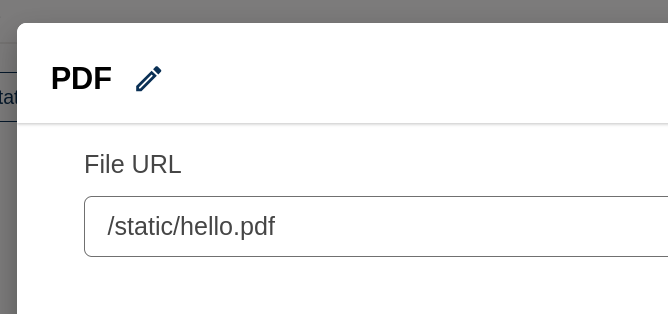
|
For components in libraries, the uploaded url is stored as
`/static/filename.jpg`, but to retrieve the file, we need the full
url. Something somewhere does magic to add the full url for the student
view, but not for editing. So we do it manually here.
|
@Kelketek I've pushed a fix for previewing the images when in libraries. I couldn't reproduce the issue with viewing images in the student view for embedding library content in the course though; could you recheck and share a reproducer if it's still an issue? Thanks! :) |

|
@samuelallan72 Previewing in libraries works now, but embedding flashcards using Library content within a course fails for me still. The URL it attempts to fetch for a picture of a red fox I uploaded: http://local.openedx.io:8000/asset-v1:Test+TS100+2026+type@asset+block/red-fox.jpg In Studio, it is: http://studio.local.openedx.io:8001/asset-v1:Test+TS100+2026+type@asset+block/red-fox.jpg Do you get similar URLs? Are they working for you? I did notice that on my devstack, PDFs are similarly broken and use similar URLs. I tried them both locally and on sandbox.opencraft.com, and they're broken in both places. This might mean that something has changed in asset handling that breaks things, unrelated to this PR. What version of the platform are you using? |
|
@Kelketek sorry I'm not sure exactly what you mean by
😅 |
from tutor import hooks

# Make the exemplar blocks available in libraries for creation.
hooks.Filters.ENV_PATCHES.add_item((
    "openedx-cms-common-settings",
"""
LIBRARY_ENABLED_BLOCKS.extend([
    "openedx_flashcards",
])
""",
))
|
|
@Kelketek huh interesting, it's working for me.
This is on a local master devstack. |
I'll take your word for it, since I know it used to work for the PDF block, and that's failing the same way when I test. Let me know when you're ready for another look. |
Note that this affects the pdf block editor too.


Description
Add custom editors for the flashcards and matching blocks. These are new blocks being implemented in openedx/xblocks-core#316 .
screenshots
Supporting information
Private-ref: https://tasks.opencraft.com/browse/BB-11379
Testing instructions
Other information
Depends-on: openedx/xblocks-core#316
Best Practices Checklist
We're trying to move away from some deprecated patterns in this codebase. Please
check if your PR meets these recommendations before asking for a review:
.ts,.tsx).propTypesanddefaultPropsin any new or modified code.src/testUtils.tsx(specificallyinitializeMocks)apiHooks.tsin this repo for examples.messages.tsfiles have adescriptionfor translators to use.../in import paths. To import from parent folders, use@src, e.g.import { initializeMocks } from '@src/testUtils';instead offrom '../../../../testUtils'