Repository navigation
source action->override/implement methods does not get correct name of arguments. #967


Description

Environment
- Operating System:windows 10
- JDK version:1.8.0_101
- Visual Studio Code version:1.35.1
- Java extension version:0.46.0
Steps To Reproduce
- source action->override/implement Methods
- pick one method from list
Current Result
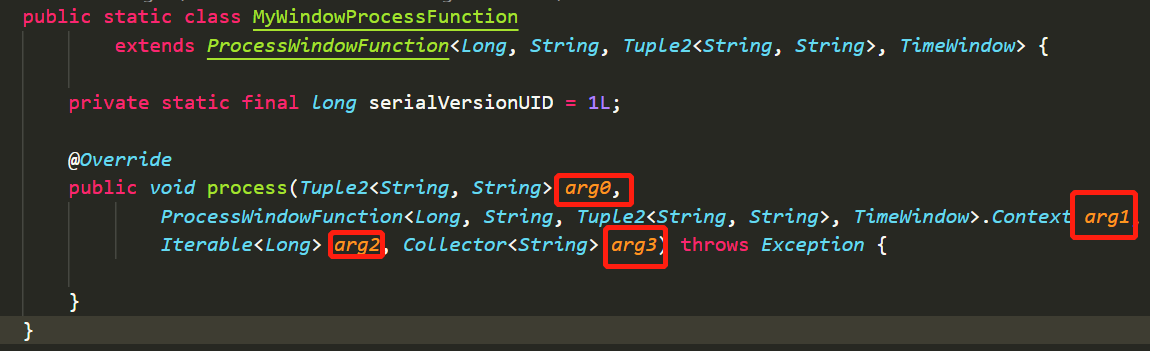
Expected Result
Name of arguments are correct,not arg0,arg1,arg2,arg3.
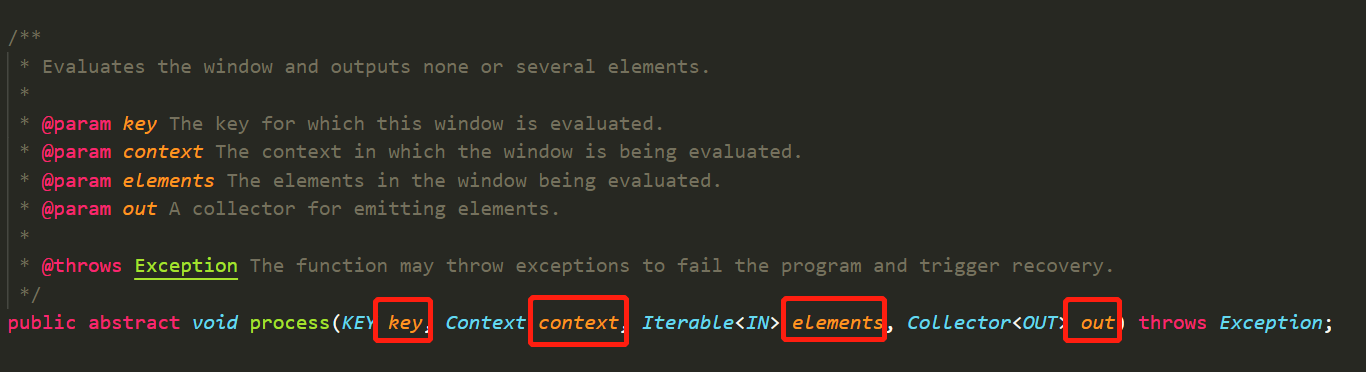
Base class method declare like below:
Additional Informations
Reacted by Leobardo Mora, CodeMw and Mohamed
Activity
fbricon commentedon Jul 4, 2019
I can't reproduce that behavior. Can you please provide a sample project?
rgrunber commentedon Jan 18, 2024
This is still an issue. I tried some simpler projects and couldn't get it to reproduce. But was able to with lemminx.
The declaration is actually
public abstract T caseOther(Pattern p);Given the original example dealt with a class that was parametrized, I suspect that's the case that misbehaves.
negativems commentedon Jan 17, 2026
Still an issue, the generated override methods always get as parameters "arg0", "arg1", etc
robstryker commentedon Oct 29, 2026
Very strange behavior here. I made a java interface
MyInterfacethat extendsList<String>Then I made a class that implements
MyInterfaceand then added all missing methods.Some of the methods got their variable name, some got arg0 and arg1.
Very easy to replicate.
MeherSru commentedon Oct 30, 2026
With the bundled JRE (no src.zip), JDT tries to get the parameter names from the online Javadoc. That works for some methods but not others, so you get a mix. With Wi-Fi off, every method gets arg0.
With a full JDK (has src.zip): all the names are correct.
Since v1.57.0, when no JDK is configured, new projects use the bundled JRE instead of the JDK from JAVA_HOME. That’s why it’s easy to hit now.
Would it make sense to go back to using the JAVA_HOME JDK by default? Happy to look into it.
robstryker commentedon Nov 2, 2026
@datho7561 This one is for you to decide. Is it better to go back to using a jdk? Or to simply instruct users that they need to configure a jdk?